Plan your SRE Agent implementation before you launch#
TL;DR — The Azure SRE Agent is easy to deploy, which is exactly why you should slow down before clicking Deploy. The important choices are not the wizard screens; they are the architecture decisions behind them: what you'll actually use it for, how far you let it act, which model provider is acceptable, how many agents your estate needs, and how you cap AAU spend. Plan it like a landing zone, not like a chatbot trial.
It's not the deploy that's hard#
The onboarding path is simple: go to sre.azure.com, complete Basics → Review → Deploy, and wait roughly 2–5 minutes. Deployment is self-contained in a single resource group, with everything the agent needs created right there.
Before the wizard can succeed, the deploying principal needs:
- Contributor on the subscription, to register providers and create resources.
- Owner or User Access Administrator as well if role assignments must be created on managed resource groups.
- Browser network access to
*.azuresre.ai.
The wizard auto-creates a small but important footprint:
| Resource | Purpose |
|---|---|
| SRE Agent resource | The agent itself, exposed as Microsoft.App/agents |
| User-assigned managed identity | The identity the agent uses to access Azure |
| Log Analytics workspace | Agent telemetry and diagnostic logs |
| Application Insights | Agent health and performance monitoring |
| Role assignments | Access granted to the managed identity |
That simplicity is useful for a first agent, but it hides the real work. Once deployed, the SRE Agent has an identity, users, approvals, run modes, telemetry, model consumption, and eventually memory, connectors, and custom capabilities. It is not just a resource in a group; it is an operating boundary.
The documented happy path is the portal wizard, but the agent is also a first-class ARM resource (Microsoft.App/agents), so IaC is possible and useful for governed fleet rollout — especially when you want model provider, run mode, and dependencies to be reviewable. Keep that light for the first launch, but do not ignore it for scale.
So the question is not "can I deploy it?" It is: what boundary am I creating, and who owns it? A few decisions are worth answering before you deploy — the rest of this post walks through them.
What is an SRE Agent actually for?#
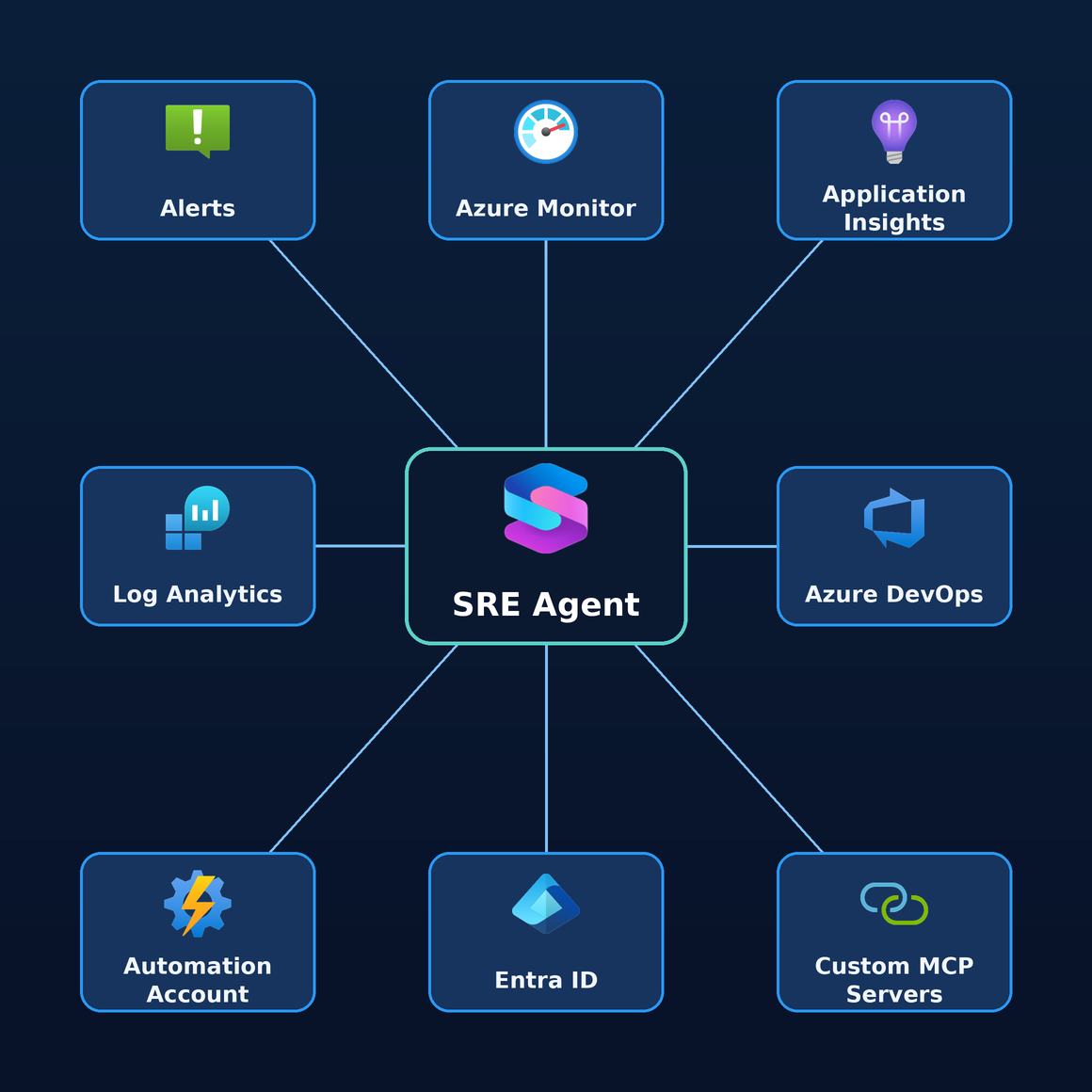
Before the governance questions, be clear on the value you're governing. The SRE Agent isn't one feature — it's a spectrum of jobs you grow into over time, all under one unified platform that eases the cognitive load on your engineers. No more stitching five tabs together at 3 AM:
- Proactive monitoring — it watches your signals continuously and surfaces issues before they page you.
- Faster investigations — it correlates telemetry, logs, and recent changes to reach root cause in minutes instead of hours.
- Audit trails — every finding, action, and approval is recorded: a defensible history of what happened and why.
- Acts on your environment — it executes remediations on your resources, following your runbooks and SOPs.
- …and more, as your team's trust and the agent's memory grow.
Under the hood, each of those jobs runs the same agentic loop — query the environment, correlate signals, reason about cause, and act — repeating continuously rather than executing a fixed script.
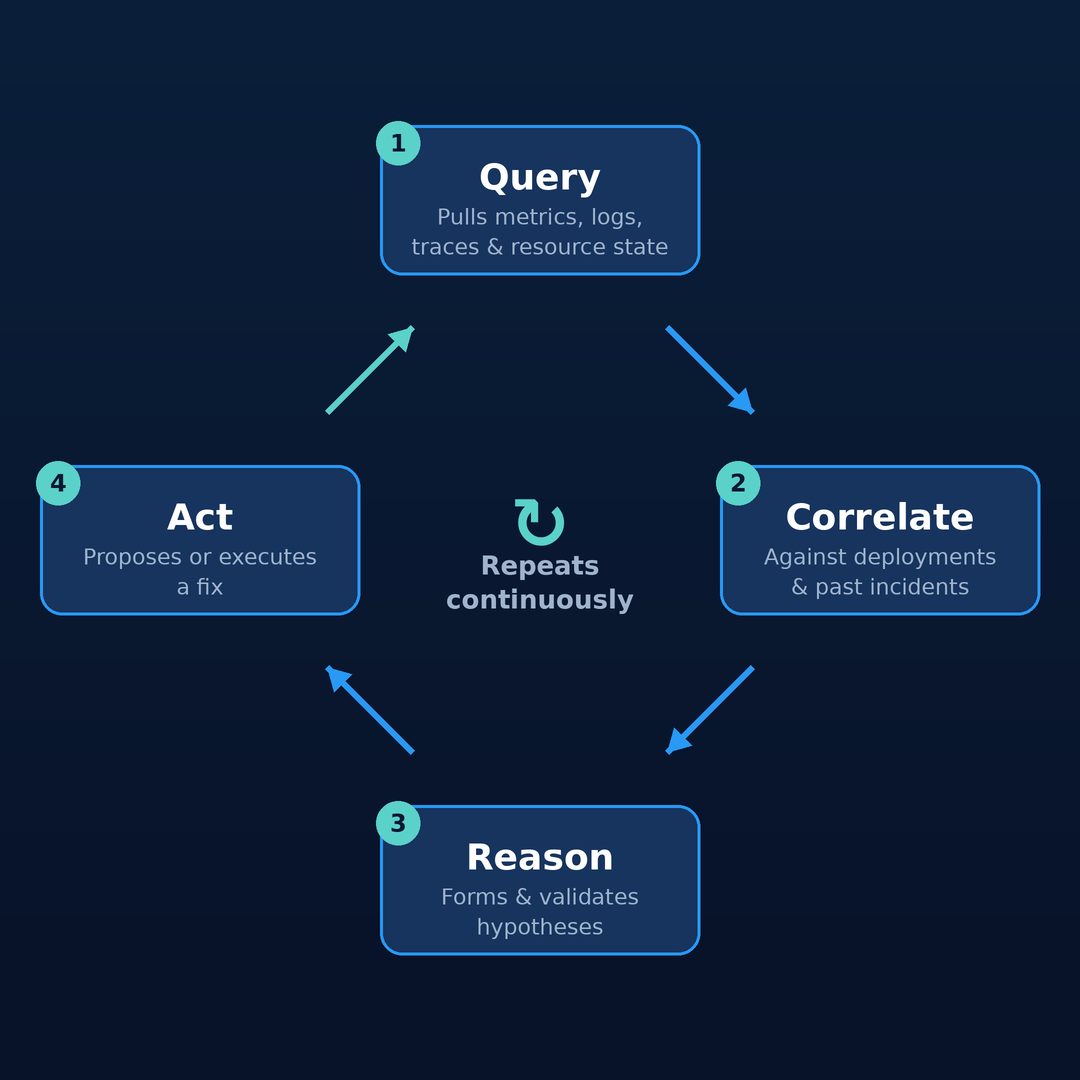
The value compounds: the more it runs, the more context it accumulates, and the more of the toil it absorbs. That's exactly why the how far can it act and how many agents questions below matter.
How far do you let it act?#
Adoption isn't a switch — it's a ladder of run modes, each with a wider blast radius. Defining that blast radius before you adopt is what makes the rollout safe.
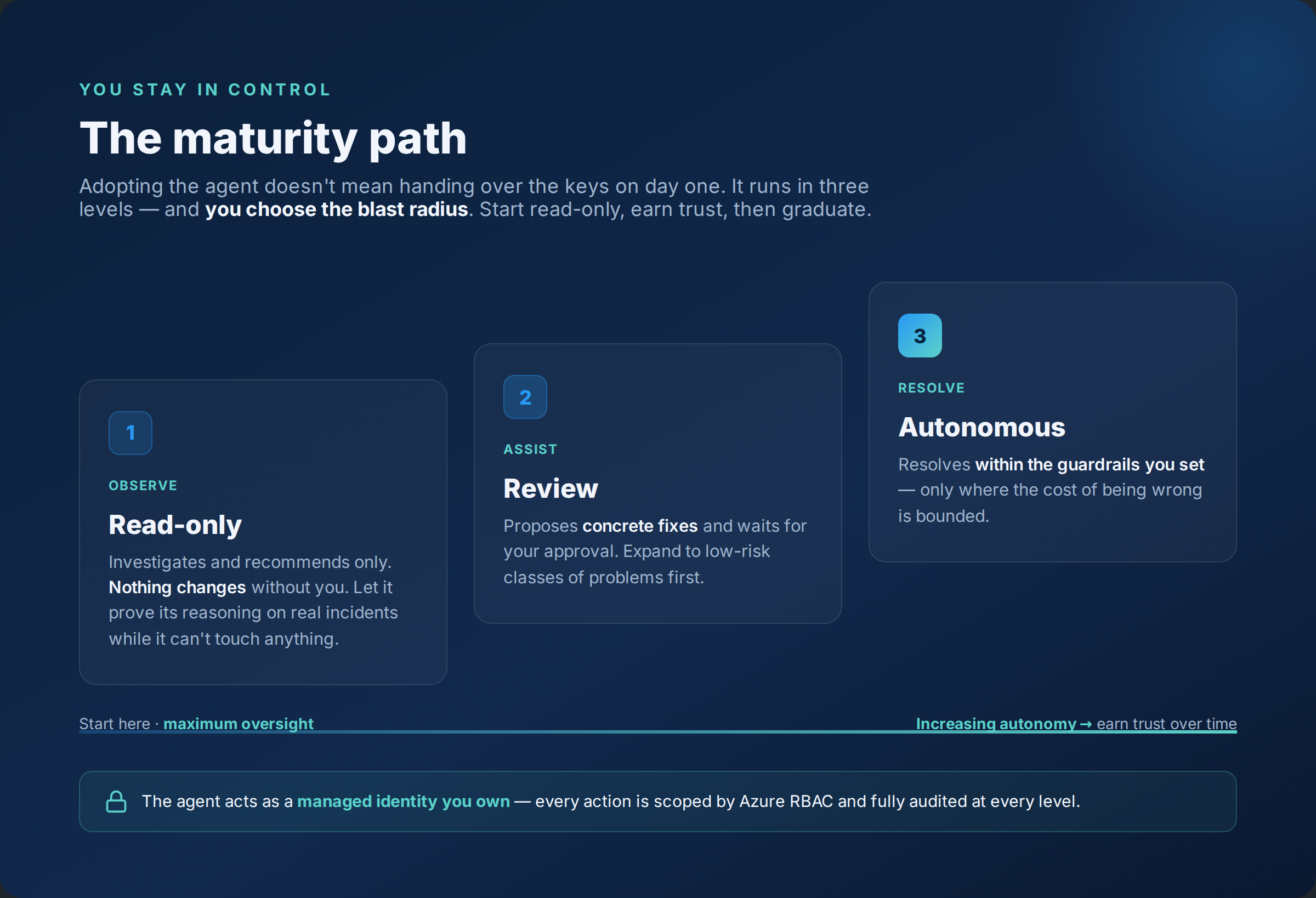
| Run mode | What it does | Blast radius |
|---|---|---|
| Read-only (crawl) | Observes and recommends. Changes nothing. | Smallest — the safe place to build trust |
| Review (walk) | Proposes actions; a human approves before anything runs. | Controlled — human in the loop |
| Autonomous (run) | Executes within its scope, following your SOPs. | Widest — reserved for trusted workflows |
Run mode is one of two controls people conflate. There are two different permission questions:
- What can the agent do in Azure?
- Who can use or administer the agent?
The first is governed by the agent's user-assigned managed identity. With no managed resource group assigned, that identity has zero permissions. You then choose a permission level per managed RG:
| Permission level | Roles assigned to the UAMI | Practical use |
|---|---|---|
| Reader (default) | Reader, Log Analytics Reader, and Monitoring Reader at RG scope, plus Monitoring Contributor at subscription scope for alert acknowledgement/closure | Start here. Actions beyond read require approval through on-behalf-of temporary elevation |
| Privileged | Everything in Reader, plus resource-type-specific Contributor roles auto-detected from the RG's resources, such as Container App Contributor or AKS roles | Use after trust is earned. Approved actions can execute directly within the granted scope |
The least-privilege pattern is clear: grant Reader at subscription scope for broad visibility, grant write or Privileged only at resource-group scope, and never blanket the identity with Contributor at subscription scope.
Keep permission level separate from run mode. Read-only, Review, and Autonomous gate execution; Reader versus Privileged defines what the identity is allowed to do if execution is permitted. They are orthogonal controls.
The second question — who can use the agent — is handled by user roles on the agent resource: SRE Agent Administrator, SRE Agent Standard User, and SRE Agent Reader. Everyone with access shares that agent's threads, approvals, and operating context — which matters when you decide how many agents to run.
Where does your data actually go?#
The model choice looks like a preference. For regulated workloads, it is a data-boundary decision — the model provider you pick decides where your operational data is processed.
| Provider | Data residency | Notes |
|---|---|---|
| Anthropic Claude | Excluded from the EU Data Boundary — data may be processed in the US | Marked preferred/default in most regions; requires a direct Anthropic agreement and is not available to all tenants |
| Azure OpenAI GPT | Covered by EU Data Boundary commitments (Sweden Central) | The deliberate choice for EU or regulated workloads; default for Sweden Central |
So for 🇪🇺 EU or regulated workloads: choose Azure OpenAI deliberately. The default is the non-compliant option for the EU — the easiest trap during onboarding. You can change the provider later in Settings → Basics, but record the choice as an audited ADR. Don't let "default" become an accidental architecture decision.
One agent, or many?#
This is where planning becomes an operating model. The core insight: where the agent lives and what it can access are decoupled. The agent resource lives in one subscription and resource group, but its managed identity can be granted roles across many subscriptions or RGs. There is no hard "one agent equals one subscription" rule.
That means placement and access are two separate decisions:
| Pattern | When it fits | Trade-off |
|---|---|---|
| Co-located | A single workload/subscription has its own agent | Simple lifecycle and billing; less useful when one team owns many subscriptions |
| Dedicated platform / management subscription | Enterprise fleets | Separates tooling from workloads, centralizes cost, keeps supporting resources out of workload RGs, and keeps the agent outside the blast radius of a subscription it may remediate |
Because everything that defines an agent — user roles, memory (team.md, architecture.md, debugging.md), connectors, secrets, run-mode blast radius, and cost — is per-agent and shared by all its users, the natural boundary is whatever shares one team, one set of connectors, one memory/context, and one blast-radius boundary. That usually points to a team.
| Model | Fits when | Pros | Cons / risks | Recommended placement |
|---|---|---|---|---|
| Per subscription / LZ / workload | A subscription equals one workload or team | Clean cost and blast-radius boundary; maps to billing | Teams owning many subscriptions get fragmented agents, memory, and threads | Co-located — deploy in the same subscription/RG it manages |
| Per team (recommended default) | A team owns several subscriptions/RGs and shares on-call responsibility | Matches team.md, ownership, connectors, user roles, and one team's mental model |
Requires discipline around prod/non-prod blast radius and cross-team boundaries | Dedicated platform/management subscription — place centrally, grant UAMI into the team's workload scopes |
| Per tenant | Very small org with one operations team | Simplest to run; single dashboard | Anti-pattern at scale: mixes teams, connectors, secrets, memory, approvals, and least privilege | Central management subscription — viable only when the tenant really has one operational boundary |
The environment axis is separate. You can choose per team and still split production from non-production. In practice, the real unit is often:
one agent per team × per environment
That lets non-prod run closer to Autonomous while prod stays in Review or Read-only until trust is earned.
What will it cost to run?#
Azure SRE Agent billing uses Azure Agent Units (AAUs) in two flows:
- Always-on flow — 4 AAUs per agent-hour, charged from creation until the agent is deleted, regardless of activity.
- Active flow — token-metered usage when the agent works, across input, output, cache-read, and cache-write, with rates that vary by model.
That means segmentation has a cost dimension. Ten agents are not just ten management objects; they are ten always-on AAU streams before any investigation begins. Every agent you stand up is a standing cost — which is exactly why the segmentation choice above matters.
For Claude Opus, the docs give rough active-usage examples:
| Scenario | Approximate active usage |
|---|---|
| Quick question | ~4 AAUs |
| Incident investigation | ~35 AAUs |
| Full remediation | ~86 AAUs |
Set a monthly AAU allocation limit in Settings → Agent consumption before real users arrive, then monitor per-thread usage there. Confirm the AAU-to-currency conversion from the current pricing page when building the business case; do not invent a stale $/AAU number.
To find the current rate: the Azure SRE Agent pricing page (list price per region/currency), the Azure Pricing Calculator (model always-on + active flow together), or Cost Management + Billing in the portal for your own EA/MCA-discounted rate. Rough monthly always-on per agent ≈ 4 AAU × 730 hrs × $/AAU.
Your pre-launch checklist#
Save this before the first rollout conversation:
| Decision | What to confirm before launch |
|---|---|
| Use case | What you'll use it for is clear — and how far it'll grow (monitoring → investigations → audit → action) |
| Prerequisites | Contributor is available; Owner/User Access Administrator is available where role assignments are needed; browser can reach *.azuresre.ai |
| Run mode | Read-only, Review, or Autonomous chosen — and chosen separately from RBAC permission level |
| Access scope | Broad Reader only where needed; write/Privileged limited to RG scope |
| User roles | Administrator, Standard User, and Reader assignments mapped to real owners |
| Model provider | EU/regulated workloads deliberately choose Azure OpenAI; decision is documented |
| Segmentation map | Per subscription, per team, or per tenant decided; prod/non-prod split decided separately |
| Placement | Co-located for simple single-subscription cases; platform/management subscription for fleets |
| Cost cap | Monthly AAU allocation limit set in Settings → Agent consumption; cost owner named |
| Management surface | Owners know where Basics, consumption, connectors, role assignments, and run modes are managed |
If you cannot fill this table, you are not blocked from deploying. You are just choosing to discover the architecture later, under pressure.
Where this leaves the platform engineer#
The Azure SRE Agent is quick to create, but the value comes from designing the system it is allowed to operate: what it's for, how far it can act, model choices, cost caps, and ownership boundaries.
The next posts go deeper into how it works under the hood — identity internals, team.md, subagents, connectors, and deep context.
Do the planning first. The safest agent is the one whose boundary was designed before the incident.