On the Azure SRE agent#
TL;DR — The Azure SRE Agent isn't an AIOps chatbot and it isn't another script runner. It's a platform that sits at the center of your operations — connected to your alerts, monitoring, source control, automation, and identity — that investigates and acts on your Azure estate, under guardrails you control. For 20 years Ops scaled by adding people and scripts. That era just ended.
The framing problem#
When most people first hear "Azure SRE Agent," they slot it into a familiar box: an AIOps chatbot, a smarter alert summarizer, a wrapper around a few runbooks. That mental model is wrong, and it's the single biggest reason teams underestimate what's in front of them.
The reality is closer to a new operating layer for your cloud — one that doesn't just show you what's happening, it does something about it. Understanding that distinction is the whole point of this post.
Not another agent — a platform built for control and scale#
A useful way to picture it: the SRE Agent sits in the middle of your operational stack, with your existing tools arranged around it as sources and actions.
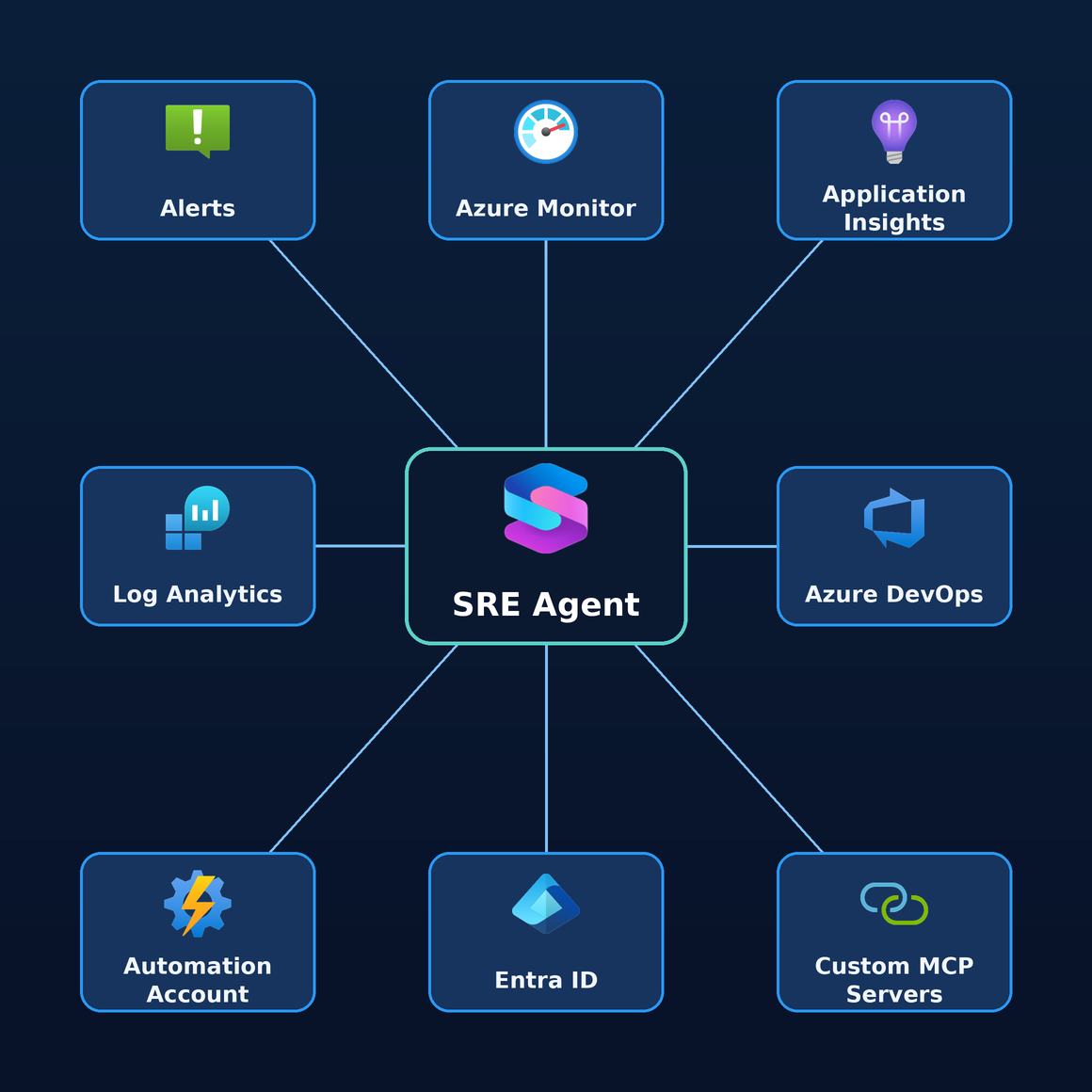
Each of those connections is a place the agent can read evidence from or take action through:
- Alerts / Azure Monitor — where signals and metrics originate.
- Log Analytics — the query surface for logs and KQL-based investigation.
- Azure DevOps / GitHub — deployment history and code context ("did the 14:02 release cause this?").
- Automation Account / runbooks — existing remediation it can invoke instead of replace.
- Entra Id (managed identity) — the agent acts as an identity you own, governed by Azure RBAC.
And critically, this isn't a fixed set. Through connectors and MCP, the same hub reaches Datadog, Splunk, New Relic, ServiceNow, PagerDuty, and any custom system you expose — so the diagram above is really just the visible front of a much deeper mesh of integrations.
But the diagram only shows the connections. The reason this is a platform and not a feature is everything that compounds behind it — and it grows by the day:
- Memory — every investigation and fix is retained, so the agent gets sharper over time instead of starting cold ("we saw this three weeks ago — here's what worked").
- Instructions — you teach it your environment, conventions, and escalation rules so its behavior reflects your team, not a generic default.
- SOPs & knowledge — upload runbooks, postmortems, release notes, and standard operating procedures; the agent indexes them and reasons from your documented practices.
- Skills — reusable, automatic procedures the agent applies without being asked, encoding the routine steps your team already knows by heart.
- Custom agents — domain specialists (database, networking, security, deployment) you compose and hand off between, each with its own tools and scope.
- Connectors — the ever-expanding set of data sources and actions that widen what the agent can see and do.
Each of these is a dial you turn up over time. The platform you stand up on day one is the smallest version of it — every incident, every SOP, every connector you add makes it more capable. That's what "built for scale" really means: not just handling more load, but getting better and broader the longer it runs.
The portal shows you Azure. The agent runs it with you.
What "agentic" actually means here#
The word "agentic" gets overused, so let's ground it. Instead of clicking through blades and stitching CLI commands together, you describe intent, and the agent operates your estate end to end. Concretely, it:
- Queries — pulls metrics, logs, traces, and resource state across connected sources.
- Correlates — lines up symptoms against deployment history and prior incidents.
- Reasons — forms hypotheses and validates each against evidence.
- Acts — proposes or executes a fix, depending on the run mode you've set.
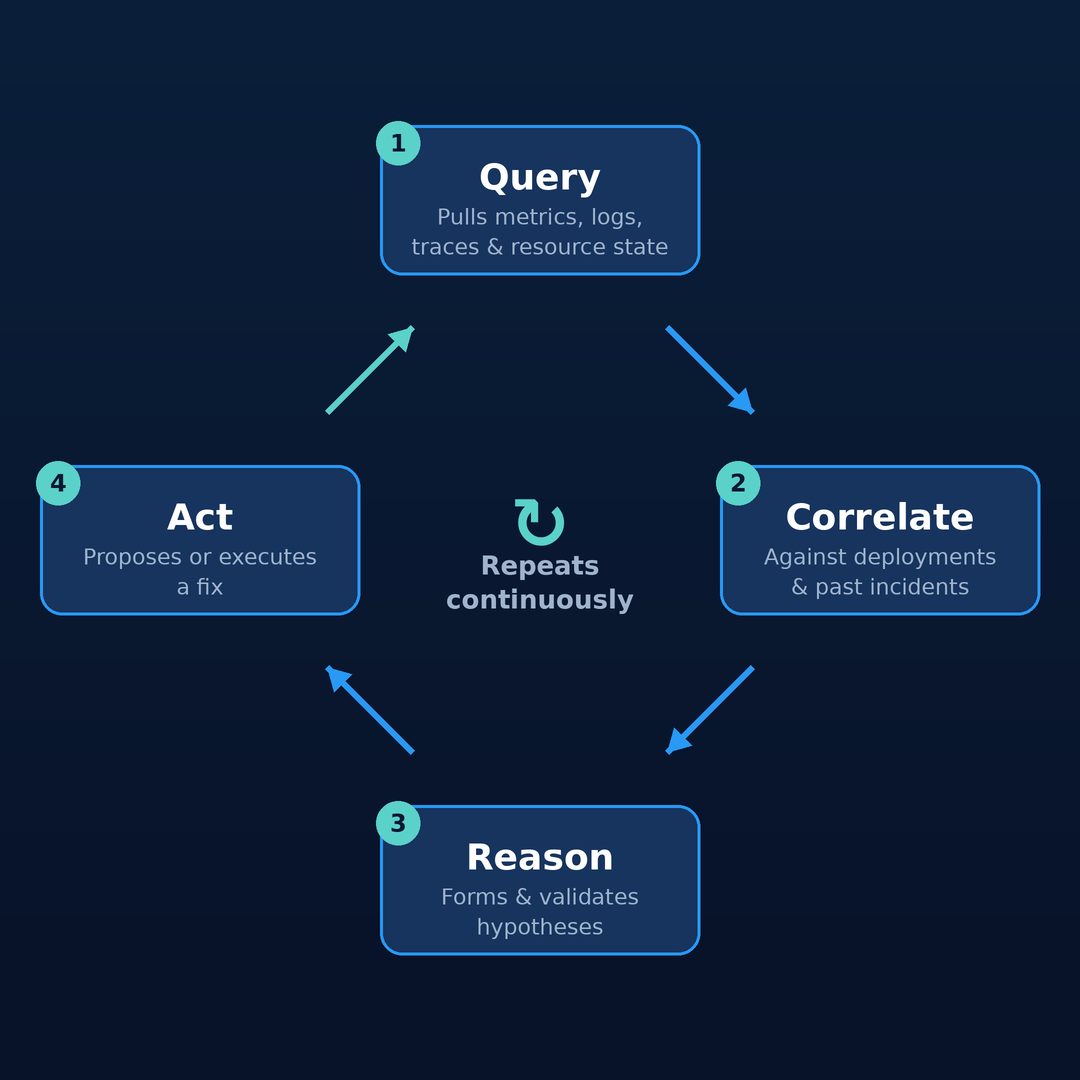
And it doesn't stop after one pass. This isn't a one-shot script that runs and exits — it's a continuous loop. After it acts, it observes the result and starts again: re-querying, re-correlating, and reasoning about whether the situation actually improved. The cycle repeats until the problem is genuinely resolved, which is what lets it work an incident to completion rather than firing a single fix and hoping.
That last step is what separates it from everything that came before.
Why it's different from runbooks, scripts, and dashboards#
This is the part worth slowing down on, because it's where the "just a chatbot" framing collapses.
| Runbooks | Scripts | Dashboards | SRE Agent | |
|---|---|---|---|---|
| Adapts to the situation | ❌ static |
❌ fixed logic |
❌ data only |
✅ reasons per incident |
| Learns over time | ❌ goes stale |
❌ N/A |
❌ N/A |
✅ memory grows with every fix |
| Correlates across tools | ❌ manual |
⚠️ if coded |
❌ you correlate |
✅ automatic |
| Takes action | ⚠️ if executed |
✅ blindly | ❌ N/A |
✅ under guardrails |
- Unlike runbooks — it learns from every incident; its memory grows instead of going stale.
- Unlike scripts — it adapts and reasons about the specific situation, correlating evidence across sources rather than executing fixed logic.
- Unlike dashboards — it acts: it interprets the data, forms hypotheses, and proposes solutions. You review conclusions, not raw metrics.
But here's the nuance that matters most — and the mindset to keep throughout this series: the SRE Agent isn't here to replace your runbooks, scripts, and dashboards. It integrates them. Your existing automation, alert rules, deployment pipelines, and observability investments don't get thrown away; they become the sources and actions the agent reasons over and orchestrates.
So this is not a call to rip out everything you've already built. It's the opposite: keep your proven processes and flows, and let the agent enrich them — invoking that runbook at the right moment, reading that dashboard's underlying data, triggering that script with context it couldn't have on its own. The value isn't in replacement; it's in stitching every source and tool into a single, organic operating environment where the pieces finally work together instead of in isolation.
That's the lens to read the rest with: not "tear it down and start over," but "connect what you have into one platform that can finally act on all of it."
A 3 AM incident, before and after#
The clearest way to feel the difference is the on-call story.
Before. A page fires at 3 AM. You wake up, open PagerDuty, then Grafana, then Log Analytics, then Slack, then a stale runbook in a wiki nobody's updated in a year. You context-switch across six tabs, reconstruct what changed, and eventually find the bad deployment. The knowledge lives only in your head; tomorrow it's a screenshot in a thread.
After. The agent acknowledges the alert within seconds. It queries observability, correlates with the latest deployment, checks memory ("we saw this three weeks ago — here's what fixed it"), forms and validates hypotheses, and either resolves the issue autonomously or leaves a clear recommendation with a full reasoning trail. By the time you wake up, it's handled — or one approval away. Zero tabs opened. Sleep uninterrupted. The investigation is a shareable deep link, not tribal knowledge.
That flow — acknowledge → query → correlate → check memory → hypothesize → resolve — is the heartbeat of the product.
You stay in control: the maturity path#
Adopting this doesn't mean handing over the keys on day one. The agent runs in three maturity levels, and you choose the blast radius:
- Read-only → investigates and recommends only. Nothing changes without you.
- Review → proposes concrete fixes and waits for your approval.
- Autonomous → resolves within the guardrails you've explicitly set.
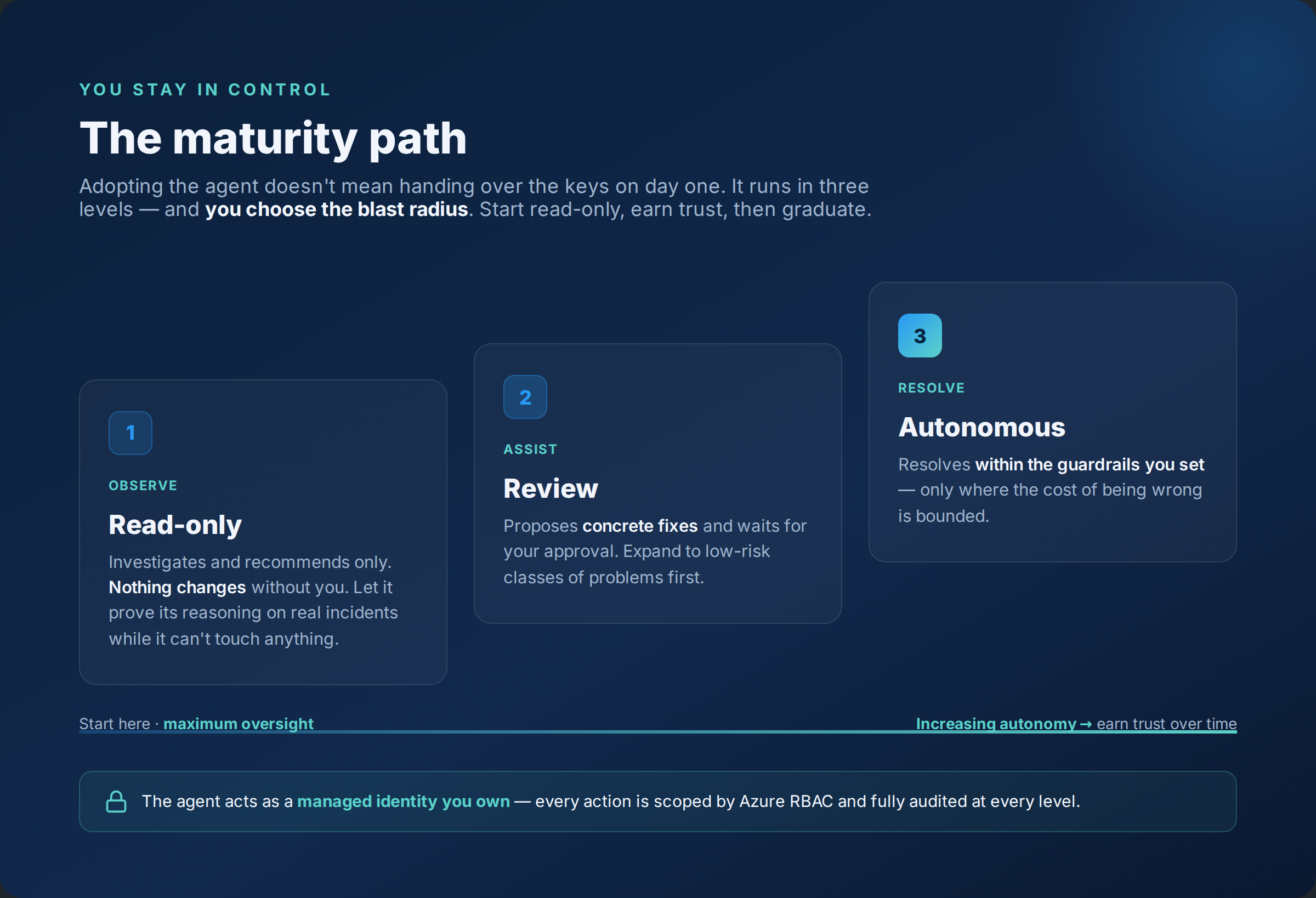
The right adoption pattern is almost always the same: start read-only, earn trust, then graduate. Let it prove its reasoning on real incidents while it can't touch anything, expand to review for low-risk classes of problems, and only then allow autonomous resolution where the cost of being wrong is bounded.
Because the agent acts as a managed identity you own, every action is scoped by Azure RBAC and fully audited — the guardrails are the same ones you already trust for the rest of your estate.
Why now#
Three things make this the moment to learn the operating model rather than wait:
- It's GA. This is no longer a preview experiment — customers are evaluating it in production today.
- The proof points are real. Microsoft runs 1,300+ SRE Agents internally, mitigating 35,000+ incidents per month and saving 20,000+ engineering hours. That's not a demo; that's an operating model at scale.
- The advantage is to the early. The teams that learn this now — how to connect it, how to set guardrails, how to graduate maturity safely — become the trusted advisors when everyone else is still arguing about whether it's "just a chatbot."
Where this leaves the SRE / platform engineer#
The honest take: the agent won't replace the operator — it changes what the operator does. Less time spent as a human alert-router stitching tabs together at 3 AM; more time spent designing the system the agent operates: which sources it sees, which actions it's allowed, where the guardrails sit, and how trust graduates. That's a more leveraged, more strategic role — and it's the skills shift worth getting ahead of.
For 20 years, Ops scaled by adding people and scripts. That era just ended.